week 8

Render woes

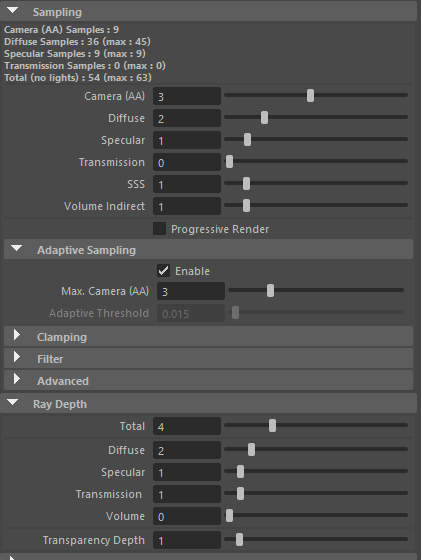
Render settings:

  • 262 frames ~3hrs
  • Each frame rendered between 30-40 seconds using CPU rendering
  • noise reduction within after effects applied to give final video result

Things to consider going forward

  • Gpu rendering was fast but produces so much noise unless the sampling is increaded to a number not viable for a semester film (30-40 AA samples) 5 mins per frame… not reasonable same thing happens with cpu to get a noise free 1080p image
  • subsurface will probably need to be turned to zero. Not sure if it adds much to the material, and it certainly makes the render take longer
  • closer camera angles seem to take longer to render than shots that are further away (again assuming this is the subsurface aspect thats causing that?)
  • If I can figure out better render settings, or just expect it to take forever, my computer can handle it, but for this specific one, I had to split the load between two computers remotely
  • gpu denoising using isnt temporally consistent, and cpu denoising takes so long to apply to each frame it would be quicker to just up the sampling and live with the 4-6 hr render
  • turn off volumetric shadows? volume samples are at 5 right now I imagin that also has a big effect considering its a skydome light

week 6

Animatic but 3D ooooh, ahhhhh…. ehhh ok.

I added sound in a later version but it actually detracted from the overall film.

The acting beats in the middle when the sphere is supposed to act confused, and sad doesnt read, re vist the acting choices there, also consider not having the camera move and keep the camera on the right side of the cone.

Partner Animatics

I edited Sahana’s

Just changed the intro shot and let the branch transformation shot, do double duty as an establishing shot